What are trust signals on a website?
Definition
Trust signals are the details on a website that show a visitor your business is real, qualified and reliable before they contact you. They include license and insurance details, reviews and testimonials, guarantees, years in business, memberships, real photos of your team and work, and clear contact details.
Why trust signals matter
A first-time visitor is deciding, often within seconds, whether to let you into their home, hand you a deposit or trust you with a problem. Trust signals answer the questions they won't ask out loud: are you licensed, are you insured, have other people been happy, and will you still be around if something goes wrong?
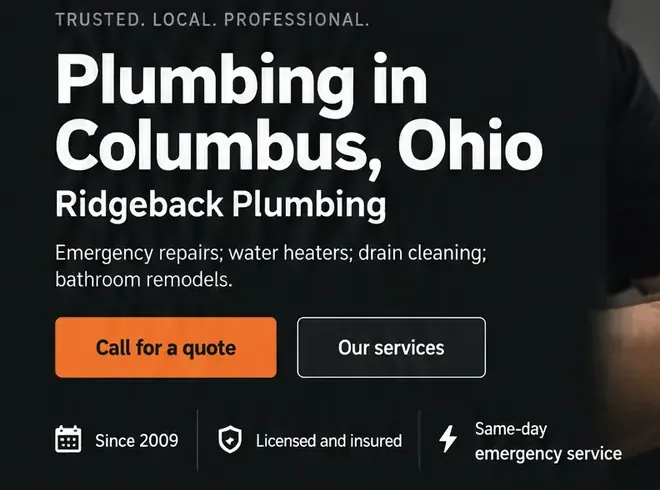
Placement matters as much as having them. Put the strongest ones right under your headline and beside your main button, repeat your license and insurance in the footer, and show reviews next to the Call or Quote button, where the decision happens. A trust page nobody visits does little on its own.
The right signals depend on the trade. For roofers, it's manufacturer certifications, workmanship warranties and photos of finished roofs nearby. For HVAC companies, it's technician certifications, the equipment brands you're trained on and a satisfaction guarantee. For plumbers and contractors, it's a license number people can look up, proof of insurance and how long you've been in business.
Only show what's true and current. A badge you didn't earn, an expired license number or a stock photo of someone else's crew does more harm than showing nothing, and customers can check. Look over your trust details once a year, when your license and insurance renew.
Trust signals to add to your website
- Your license number, and the state or towns it covers.
- Proof of insurance, and bonding if your trade requires it.
- Recent reviews with names, close to your main button.
- Your guarantee or warranty, in one plain sentence.
- Real photos of your team, your vehicles and your finished work.
- Years in business, plus any memberships or certifications you hold.
- A real phone number and, if customers visit, your address.
How Future handles it
Many Future designs place proof such as years in business or a licensed-and-insured line just below the main heading, and you can change them by click or in plain words. If a sample badge or placeholder line is still on the page when you go to publish, Future's checklist lists it, so you can swap in details you've actually earned.
Reviews are the trust signal that goes stale fastest. On Pro and Premier, every booked visit is followed by a review request you've worded, so the reviews beside your button stay recent.