Three homepage designs for your roofing company
Drawn from your answers, with a roofing logo on each. Pick one and change any word or photo in a click.
Hail rolls through on a Tuesday night. By breakfast, half the street is on their phones, hunting for a roofer who looks local, established and straight about insurance. Good roofing website design wins that search. Future shows you three homepages for your roofing company in minutes, then builds the site: an inspection request on every page, a storm-damage page that explains the claim, and your best roofs up front.
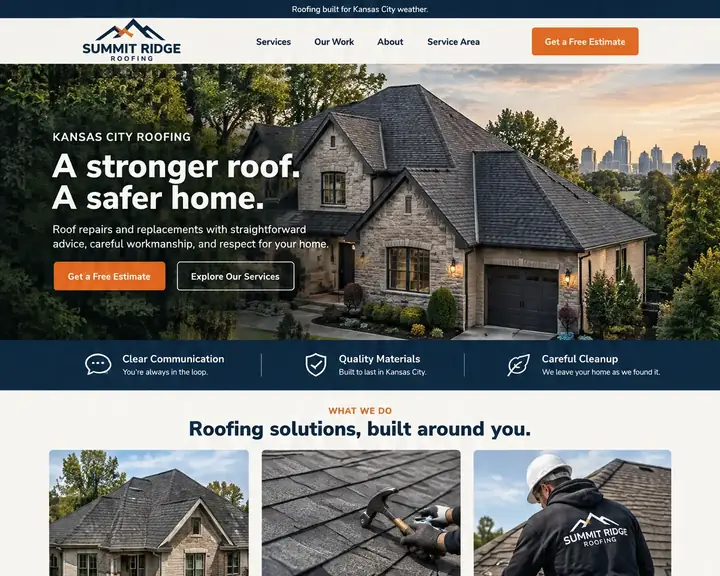
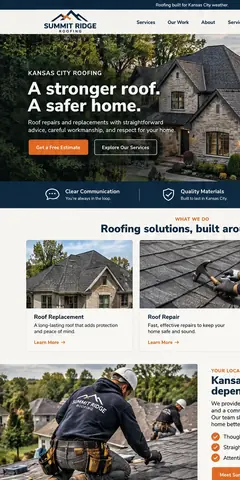
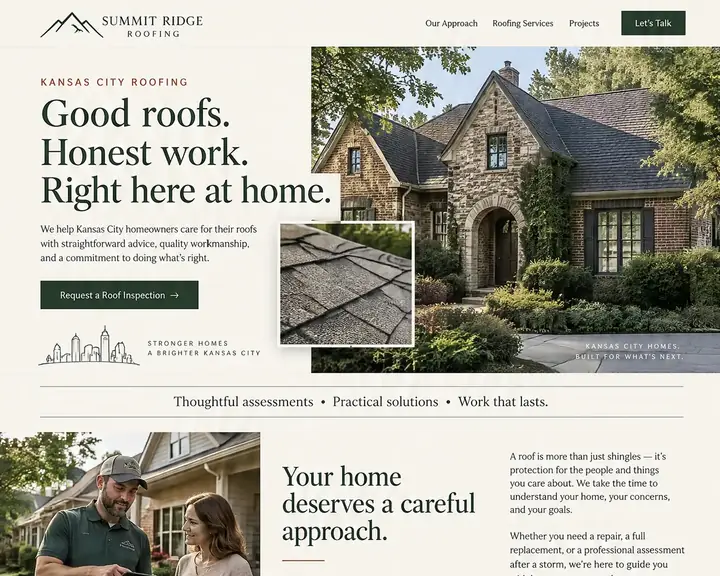
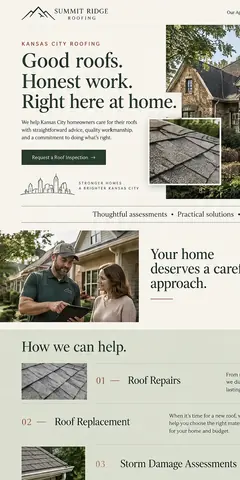
Example looks for one roofing company: bold navy with orange estimate buttons, and a calmer cream and forest green. Each one lists storm damage as its own service, shows finished roofs around town and keeps the inspection request in easy reach. Tap a design to see the whole page.
A new roof is one of the biggest repairs a homeowner ever pays for, and they shop for it on a phone, often standing in the yard looking up. Good roofing web design turns that look into a booked inspection. Here's what that takes.
After hail or high wind, homeowners search before they call their insurer. Give storm damage its own page: what to check from the ground, why not to climb up, how your free inspection works and how soon you can come out.
Walk through the claim in order: photograph the damage, call the insurer, meet the adjuster, agree the scope. Say what you do at each step. Never promise a claim will be paid; the roofer who doesn't overpromise is the one who gets trusted.
A short contact form that asks for the address, what they're seeing (a leak, missing shingles, dents from hail), roughly how old the roof is and whether a claim is already open. You know the job before you load the ladder.
Show the same house twice: worn, curling shingles, then the clean new ridge line. Caption each job with the material and the neighborhood. A gallery of your own tear-offs says more than any stock photo of a smiling crew.
Homeowners want to know whether to patch or replace, and how asphalt, metal and tile differ in looks and lifespan. A page for each material, with color photos from your jobs, lets them decide before the estimate visit.
A full replacement is a big check to write at once. If you offer financing through a lender, give it a page and a line near the estimate button, with a link to apply. Leave rates and monthly figures to the lender.
Show your license or registration if your state requires one, your insurance, and only the manufacturer certifications you really hold. Spell out your workmanship warranty in years and what it covers. Homeowners check these trust signals before they sign anything.
Name every town and county you work in, and give your busiest ones a service area page. Put recent reviews beside the estimate button, ideally from homeowners in those towns. After a storm, local proof beats any slogan.
Good roofer web design starts with these eleven pages, plus one for metal, commercial or gutter work if you do it. Starter includes up to 50 pages, so there's room for a page per town too.
After a hailstorm, searches like "roof repair near me" and "hail damage roofer" pick up in the towns it hit, and Google answers many of them with a map of nearby roofers. A complete Google Business Profile is how you get onto that map: the right category, your service area, real job photos and a steady stream of reviews.
Your website does the rest of the local SEO work. Name each town you roof on its own page, keep your business name, address and phone identical everywhere, and give storm damage, replacement and repair separate pages so each can match its own search. On every plan, Future fills in the page titles, descriptions and business details that Google and AI answers read.
Reviews weigh more than usual in roofing, because every big storm brings out-of-town crews knocking on doors, and homeowners know it. Ask each customer once the cleanup is done and the magnets have swept the lawn. On Pro, Future can send that review request for you once an online-booked job is finished, phrased the way you'd say it.
A roofing web design agency will often quote a custom build plus a monthly marketing fee, while a do-it-yourself template costs little but your evenings. The table shows the usual price of each route, from one published guide.
| Who builds it | Upfront | Each month | Who does the work | Time to see a design |
|---|---|---|---|---|
| Agency | $3,000 to $30,000+ | Often extra: hosting, changes and marketing are usually billed on top. | The agency. You review and wait. | A few weeks |
| Freelancer | $500 to $10,000+ | Hosting and changes are often billed separately. | The freelancer, while they're available. | Days to weeks |
| DIY builder | $0, plus your time | $17 to $500+ a month | You: pick a template, write it and keep it current. | After you build it |
| Future | $0 to see three designs | From $19 a month billed yearly. Pro $39, or $28 at the founding price. | Future designs and builds it. You edit by click or in plain words. | Minutes, free |
For a roofer, the costly website is the one you can't change when the weather turns. Inspection requests come in a rush after a storm, so choose a setup that lets you post a storm page, add a town or swap in fresh roof photos the same day, without waiting on anyone.
Sources: WebFX, How Much Does a Website Cost in 2026? (agency design, freelancer design and DIY builder rows), read October 24, 2026. Future's prices are from our plans; ranges elsewhere vary, and your quote will differ.
Your company name, the roofing work you do and the city you work from. One line is enough to start.
Three different homepages for your company in minutes, logos included. Compare them side by side before you pay a thing.
Your chosen design becomes a full roofing site, laid out with responsive design for phones and computers. Add your storm-damage page, your towns and photos of your own roofs, then publish.
Drawn from your answers, with a roofing logo on each. Pick one and change any word or photo in a click.
A short form for the address and the roof problem. Each request lands in your email and your contacts.
Show each finished roof in galleries and slideshows, and check how they look on a phone before you publish.
Replacement, repair, storm damage, metal and gutters, plus your towns. Starter has room for 50 pages; Pro, 150.
Turn on visit paths and each inspection request shows whether that person viewed your storm page or financing first, in plain words, without third-party trackers.
For jobs booked through your site, a review request goes out once the crew has packed up, worded the way you'd say it.
See every lead from inspection request to signed job, in stages you name yourself, with the next step in view.
Ask for a storm banner on the homepage in plain words, or click and type. Nothing changes on your live site until you publish.
The three roofing designs are yours to look at for free. You pay only when you decide to build and publish. 15 days money back, minus a claimed domain's cost.
Design and email limits vary by plan.
A great website, ready fast.Your website and the marketing essentials.
Billed yearly, $228 a year. Or $26/month billed monthly.
Billed monthly
Up to 50 pages and 5 GB of files · 1 new design a month · 2 team members
Everything you need to start:
Also in every plan:
Coming soon: Free domain for year one on yearly plans.
Get found, get booked, get paid.
Billed yearly, $336 a year. Or $47/month billed monthly.
Yearly plans started by November 7. Kept while your plan stays active.
New yearly sign-ups after November 7: $39/month ($468 a year).
Billed monthly
Everything in Starter, plus booking, a shop, review requests and automatic emails.
Everything in Starter, plus:
Also in every plan:
Coming soon: Gift cards, 100 text messages a month, Simple monthly report, Free domain for year one on yearly plans.
More reach, with a person on your side.
Billed yearly, $828 a year. Or $119/month billed monthly.
Yearly plans started by November 7. Kept while your plan stays active.
New yearly sign-ups after November 7: $99/month ($1,188 a year).
Billed monthly
Everything in Pro, plus:
Also in every plan:
Coming soon: 250 texts a month, AI visibility report, Weekly rank tracking, Local map rankings, AI visibility check, Monthly growth report with suggestions, Competitor watch, Your own app included, Free domain for year one on yearly plans.
See your designs and templates free, and pay when you're ready to build and publish. 15 days money back, minus a claimed domain's cost.
Prices shown are per month for yearly plans, paid in full when you buy. Monthly plans are also available. You'll see the final price, including any tax, before you pay.
Pick your design now; plans open soon.
See every plan in full →How Future compares with Squarespace →
An inspection request on every page, your phone number up top, a storm-damage page that explains insurance claims, a page each for replacement and repair, your materials and colors, financing through your lender, before-and-after photos, your warranty and license, the towns you serve and recent reviews.
We make Future, so we're biased; here's an honest test for any roofing website builder. Ask it for a homepage made for your company, then check for a storm-damage page, an inspection request, your towns and room for your own roof photos. Future shows you three homepage designs for your company, free, in minutes, so you can judge before you pay anything.
Agency builds run $3,000 to $30,000+, freelancers $500 to $10,000+ and do-it-yourself builders $17 to $500+ a month, according to one published price guide. With Future, looking at your three designs costs nothing. Billed yearly, Starter costs $19 a month and Pro $39, with hosting, upkeep and design changes included.
If you want work beyond referrals, yes. A roof is a big, rare purchase, so homeowners compare several roofers before letting one up the ladder, and your site is where they look for real roofs, a local address and reviews. A Google profile alone can't show storm-damage help, financing or your warranty.
Eleven pages cover most roofers: home, replacement, repair, storm damage, materials, financing, your work, warranties, areas served, about and reviews, and an inspection request. Add a page for each town you roof often. Starter has space for 50 pages, Pro for 150 and Premier for 1,000.
Nobody can promise a ranking, and be wary of anyone who does. A new site helps when each service and town has its own page, your details match your Google profile and reviews keep coming in. Future handles the titles, descriptions and business details page by page; time and real local jobs do the rest.
Yes. Every Future design is built for phones as well as computers, with photos sized for each screen so galleries load quickly. Your number is one tap to call, and you can fine-tune the phone layout before you publish.
Yes, on Premier. Every inspection request becomes a lead in the CRM pipeline, and you move it along stages of your own, like inspection done, adjuster meeting, estimate sent and signed. A storm week's worth of leads stays in one list instead of a stack of sticky notes.
Your company name and the town you work from are enough. Three homepage designs for your roofing company follow, free, in minutes.